Announcing TLSA Record Support
 Anthony Eden
on
Anthony Eden
on
We're excited to announce support for one of our top-requested record types in DNSimple: TLSA records. TLSA records power DANE (DNS-based Authentication of Named Entities), a security standard that lets organizations publish certificate information directly in DNS, giving you control over which TLS certificates are valid for your domain. Instead of relying solely on Certificate Authorities, TLSA records enable certificate pinning via DNS, protecting against CA compromise and man-in-the-middle attacks.
TLSA records can secure any TLS-protected service—from web servers (HTTPS) to email servers (SMTP DANE) and beyond. For email specifically, SMTP DANE is increasingly required by financial institutions, healthcare providers, and government agencies looking to harden their email infrastructure against phishing and spoofing. With TLSA support, customers can now implement DANE across their entire TLS infrastructure, making DNSimple one of the few DNS providers to fully support DANE for enterprise-grade security.
What are TLSA records?
TLSA records bind TLS certificates to DNS names using DNSSEC. Instead of relying solely on Certificate Authorities (CAs) to validate certificates, TLSA records let you publish certificate information directly in your DNS zone. When a client connects to your server, it can verify that the certificate presented matches what's published in DNS.
This approach addresses a fundamental weakness in the traditional CA model: if any trusted CA is compromised, attackers could potentially issue fraudulent certificates for any domain. With DANE and TLSA records, you control which certificates are valid for your domain.
Why use TLSA records?
TLSA records provide several security benefits:
- Protection against CA compromise: Even if a Certificate Authority is breached, attackers cannot forge valid TLSA records for your domain without access to your DNS
- Certificate pinning via DNS: Pin specific certificates or public keys to your domain, ensuring clients only accept the certificates you authorize
- Enterprise email security: TLSA records are essential for SMTP DANE, which secures email transport between mail servers. This is increasingly required by financial institutions, healthcare providers, and government agencies to protect against phishing, spoofing, and man-in-the-middle attacks
- Defense in depth: Add another verification layer alongside traditional certificate validation
For other DNS-based and browser-based approaches to certificate trust, see our post on limiting the risks of SSL certificate mis-issuance. You can also read our post on Handshake domains to see how TLSA records help support certificate-based trust for non ICANN TLDs.
Warning
TLSA records work in conjunction with DNSSEC. DNSSEC provides the authentication chain that ensures TLSA records haven't been tampered with. If you haven't enabled DNSSEC for your domain yet, you will need to do so for TLSA records to be securely validated. All TLSA records are validated per RFC 6698 §2.1.
What uses TLSA records?
TLSA records are checked by clients and servers that support DANE when establishing TLS connections. The most widely adopted use case is SMTP DANE for email security:
- Email servers: Mail servers that support SMTP DANE (such as Postfix, Exim, and Microsoft Exchange) check TLSA records when sending email to other mail servers. This verifies that the receiving mail server's certificate matches what's published in DNS, preventing man-in-the-middle attacks during email transmission.
- Email clients: Some email clients can also verify TLSA records when connecting to mail servers using protocols like IMAPS or POP3S.
For web services, TLSA support is more limited:
- HTTPS/TLS: While TLSA records can be published for HTTPS services (using
_443._tcp), most web browsers don't yet check TLSA records by default. However, some specialized tools, security-focused browsers, and enterprise clients do support TLSA verification for HTTPS. - Other TLS services: TLSA records can be used for any TLS-protected service, including XMPP, LDAPS, and custom TLS applications. Support depends on whether the client or server software implements DANE verification.
The adoption of TLSA records is growing, particularly in enterprise and government environments where email security is critical. As more organizations implement SMTP DANE, TLSA records are becoming a standard requirement for secure email infrastructure.
How to create TLSA records in DNSimple
You can create TLSA records through the DNSimple dashboard or API.
Using the dashboard
- Navigate to your domain's DNS management page
- Click "Add Record" and select "TLSA" from the record type dropdown
- Choose your editor mode:
- Simple editor: Enter the complete TLSA record content in a single field
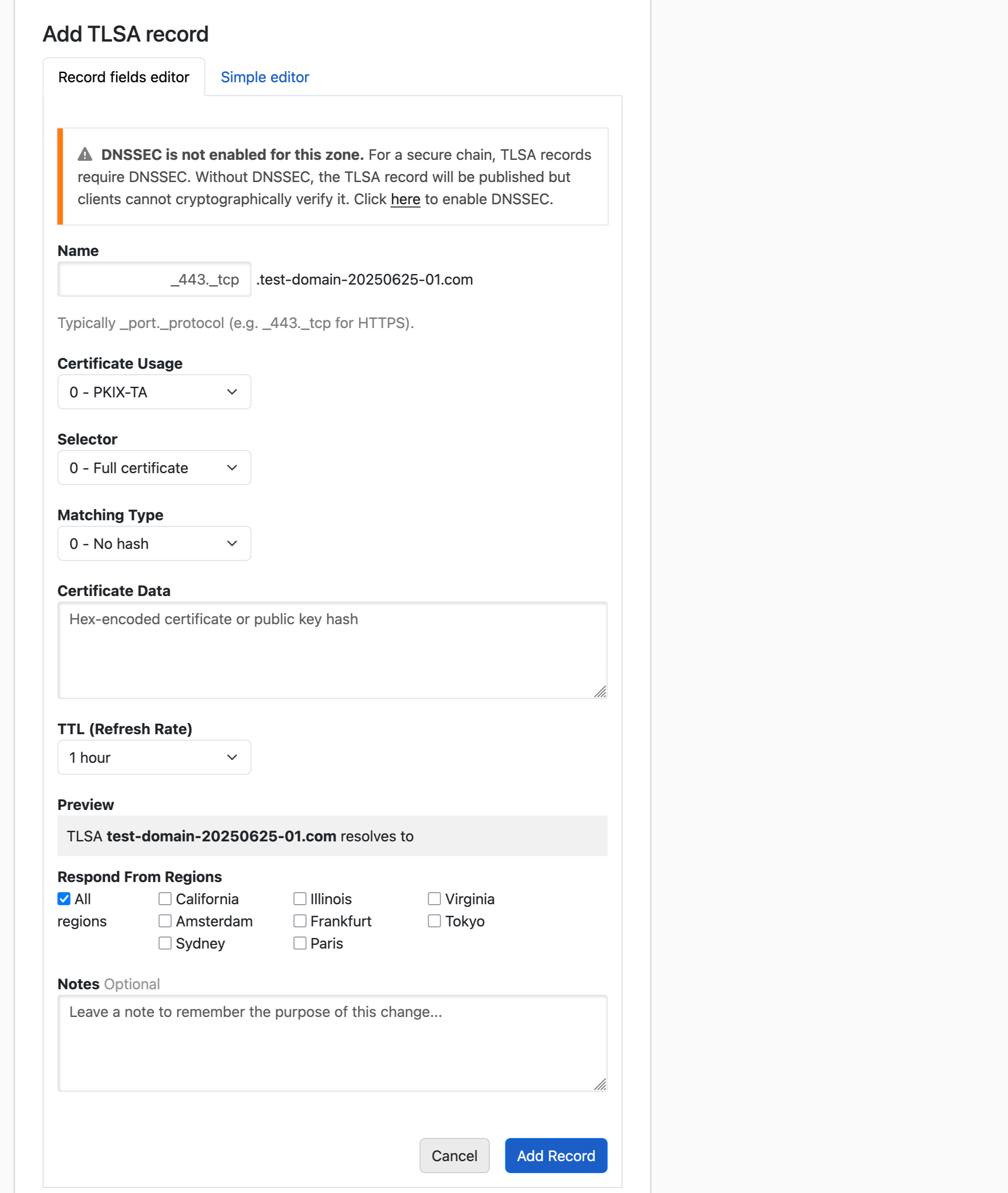
- Record fields editor: Configure each component separately:
- Name: The service and protocol prefix (e.g.,
_443._tcpfor HTTPS on port 443, or_25._tcpfor SMTP on port 25) - Certificate Usage: How the certificate should be matched (PKIX-TA, PKIX-EE, DANE-TA, or DANE-EE)
- Selector: Whether to match the full certificate or just the public key
- Matching Type: The hash algorithm used (full certificate, SHA-256, or SHA-512)
- Certificate Association Data: The certificate data or hash
- Name: The service and protocol prefix (e.g.,
- Save the record
Info
If DNSSEC is not enabled for your domain, a warning will be displayed. TLSA records require DNSSEC to be securely validated.
Using the API
Create TLSA records programmatically using the DNSimple API. Here's an example:
curl -X POST "https://api.dnsimple.com/v2/{account}/zones/{zone}/records" \
  -H "Authorization: Bearer {token}" \
  -H "Content-Type: application/json" \
  -d '{
    "name": "_443._tcp.www",
    "type": "TLSA",
    "content": "3 1 1 2bb183af273adee2e3d34ad4b1d8d193fa47d1d3c89e51b4c5ae8e7e6a6c7eb3",
    "ttl": 3600
  }'
All of our API clients are already updated to be compatible with TLSA record support, as is our Terraform provider), so you can use TLSA records throughout your infrastructure automation.
Provider support and zone management
TLSA records are fully supported across our integrated DNS providers in our Domain Control Plane:
- Route53: Full TLSA sync support
- Azure: Full TLSA sync support
- CoreDNS: Full TLSA sync support
TLSA records are also included in zone file imports and exports, and support both inbound and outbound AXFR transfers, making it easy to migrate zones with TLSA records to and from DNSimple.
Getting started
You can start creating TLSA records for your domains today. For detailed instructions on creating and managing TLSA records, visit our support documentation. For API integration details, see our developer documentation.
If you have questions about implementing TLSA records for your domain, or if there are other features you'd like to see us add, get in touch, we'd love to help.
Not using DNSimple yet? Give us a try free for 30 days, and experience enterprise-grade DNS management with full DANE support.
Anthony Eden
I break things so Simone continues to have plenty to do. I occasionally have useful ideas, like building a domain and DNS provider that doesn't suck.
We think domain management should be easy.
That's why we continue building DNSimple.