CAA and SSHFP Support for Integrated DNS Providers
 Dallas Read
on
Dallas Read
on
We've expanded record type support for Integrated DNS Providers, part of our Domain Control Plane.
If you manage DNS across multiple providers, keeping security records in sync has always required extra steps. CAA records protect your domains from unauthorized certificate issuance. SSHFP records let SSH clients verify your server's identity via DNS. Both are critical for modern security posture, but until now, they couldn't be synced through our Integrated DNS Providers. That changes today.
What's new
Azure DNS now supports:
Amazon Route 53 now supports:
This means you can now create, update, delete, and sync these record types between DNSimple and your Azure or Route 53 zones, all from a single interface.
Why this matters
CAA records keep certificates under control
Certification Authority Authorization (CAA) records tell certificate authorities which CAs are allowed to issue certificates for your domain. Without CAA records, any CA can issue a certificate for your domain. With them, you define exactly who's authorized, and unauthorized requests get blocked.
If you're managing zones at Azure or Route 53 alongside DNSimple, you've had to maintain CAA records separately at each provider. Now you can configure them once in DNSimple and sync them to your integrated zones, or import existing CAA records from Azure/Route 53 into DNSimple.
SSHFP records verify SSH server identity
SSHFP records publish your SSH server's public key fingerprint in DNS. SSH clients can then verify they're connecting to the legitimate server before establishing a connection, protecting against man-in-the-middle attacks.
Note
SSHFP records require DNSSEC to be effective. Without DNSSEC, an attacker who can spoof DNS responses could also spoof SSHFP records. Make sure DNSSEC is enabled on your zones.
Route 53 customers can now sync SSHFP records from DNSimple, making it easier to maintain consistent SSH security across your infrastructure.
How to use these new record types
If you're already using Integrated DNS Providers, these record types are available immediately.
Adding or updating records across providers:
- Navigate to your zone's Record Editor in DNSimple
- Click "Add record" and select CAA or SSHFP
- Fill in the record details
- Check the boxes for each provider where you want the record created (DNSimple, Azure, Route 53)
- Click "Add record"
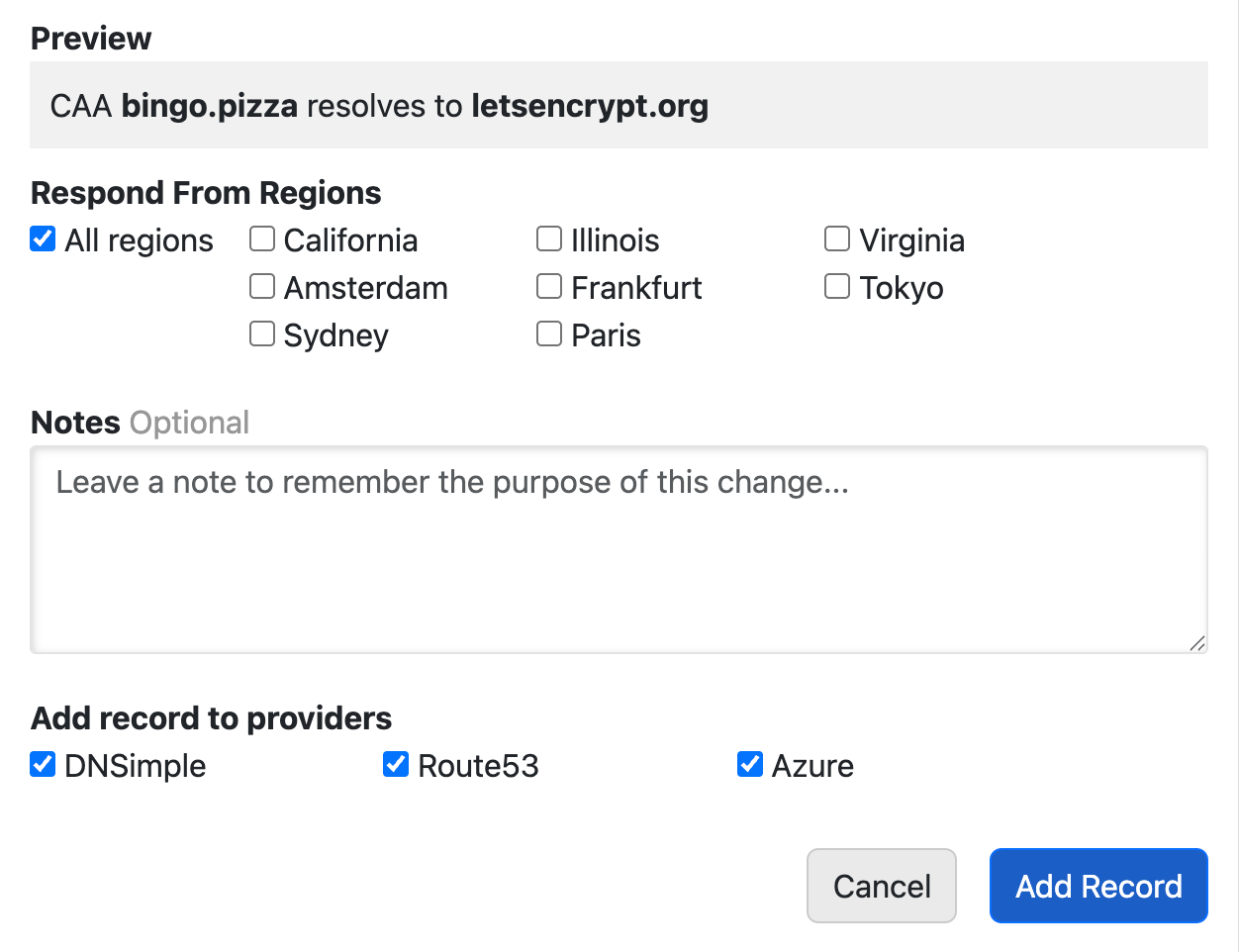
The same checkbox workflow applies when updating existing records.
Bulk syncing between providers:
If your zones are out of sync, click "Synchronize DNS records" in the Record Editor. Select your source and destination, and DNSimple will sync all supported record types (including CAA and SSHFP). Syncing works in either direction: from DNSimple to your integrated provider, or from your provider to DNSimple.
For detailed instructions, see our guides on managing CAA records and syncing integrated zone records. You can also watch our video on managing Route 53 zones in DNSimple.
What about existing records?
Your existing CAA and SSHFP records at Azure or Route 53 remain unchanged. You choose when to sync. Nothing happens automatically. When you do sync, records are merged intelligently: DNSimple won't delete records that exist only at the provider unless you explicitly remove them.
Part of a bigger picture
This update is part of our ongoing effort to bring full security record support to Integrated DNS Providers. Earlier this month, we announced TLSA record support for DANE authentication across all integrated providers: Azure, Route 53, and CoreDNS. Combined with today's CAA and SSHFP additions, you now have the tools to manage certificate authorization, SSH key verification, and DANE authentication from a single interface, regardless of where your zones are hosted.
Have questions about syncing your security records, or want to see other record types added? We'd love to hear from you.
Not using DNSimple yet? Give us a try free for 30 days. Already a customer? Learn how to connect Azure DNS or Route 53 to start using the Domain Control Plane.
Dallas Read
Dream. Risk. Win. Repeat.
We think domain management should be easy.
That's why we continue building DNSimple.